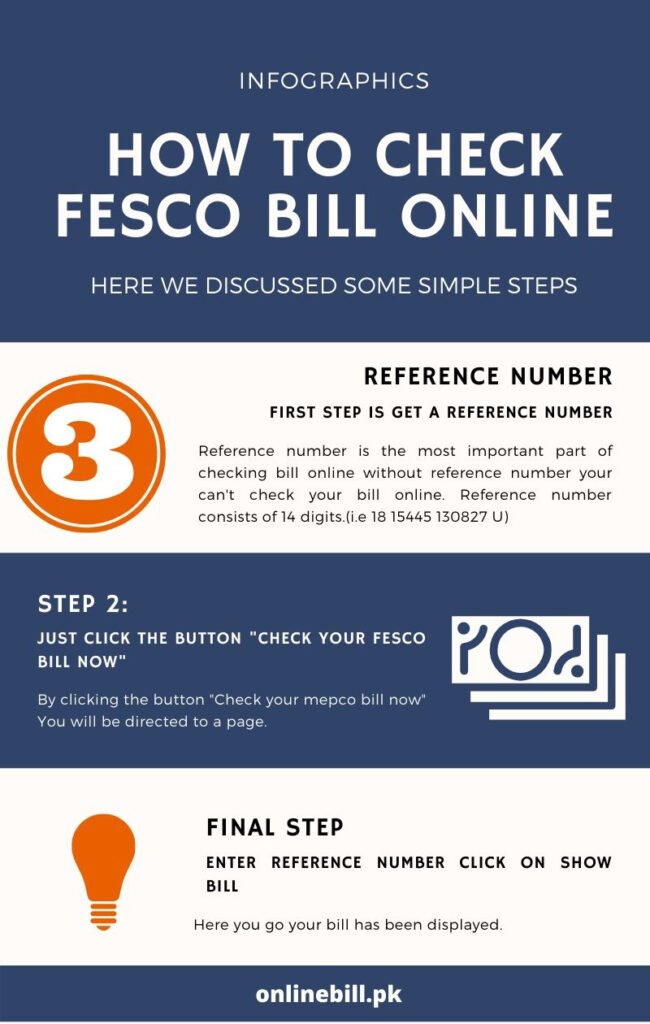
If you are looking for your FESCO online bill, you usually don’t need to wait for the printed copy to arrive at your home. With your FESCO reference number, you can check the available billing information online, review the amount due and due date, and save a duplicate copy for your records.
I built this guide for a simple reason: after working with electricity billing websites in Pakistan for several years, I have seen how confusing an electricity bill can be when you are simply trying to find out, “Is my bill correct, how much do I have to pay, and why has the amount changed?”
That is what I want this page to answer.
Faisalabad Electric Supply Company (FESCO) is one of Pakistan’s electricity distribution companies. Its service area covers Faisalabad, Sargodha, Mianwali, Khushab, Jhang, Bhakkar, Toba Tek Singh, and Chiniot.
If your electricity connection falls within FESCO’s service area, you can use our FESCO Online Bill page to start checking your bill:
Check FESCO Bill: FESCO Online Bill
A quick note from me: OnlineBill.pk is an independent website. We help consumers find and understand electricity billing information, but we are not FESCO and cannot change, correct, cancel, or issue an official electricity connection. For complaints, tariff matters, meter problems and other official services, always use FESCO’s authorized channels.
What Is FESCO Online Bill?
A FESCO online bill is the digital version of the electricity bill associated with your FESCO connection.
For many consumers, the online copy is useful when the printed bill has not arrived, has been misplaced, or is needed quickly for payment or record keeping.
When you check your bill, you may find information such as:
- Reference number
- Consumer information
- Meter number
- Billing month
- Previous and current meter readings
- Units consumed
- Tariff category
- Current charges
- Arrears, if applicable
- Taxes and government charges
- Applicable adjustments
- Due date
- Payable amount
The exact charges on a bill depend on the applicable tariff, consumption, and other billing components. This is why I don’t recommend judging a bill only by its final rupee amount.
The better approach is to look at the units, readings, tariff category and individual charges as well.
How to Check Your FESCO Online Bill
If you already have an old FESCO bill, the process is straightforward.
Step 1: Find your reference number
Take any previous FESCO electricity bill and locate your reference number.
If you have not saved it before, this is a good time to keep it somewhere secure. I personally recommend saving a clear photo or PDF of an old bill on your phone so you don’t have to search for the paper copy every month.
Step 2: Open the FESCO bill checking page
Go to our:
Step 3: Enter your billing information
Enter the required reference information carefully.
Check every digit before submitting it. A single incorrect digit can prevent the system from finding the correct billing record.
Step 4: Review your bill
Once your bill is available, don’t immediately look only at the final amount.
Check:
- Billing month
- Due date
- Previous reading
- Current reading
- Units consumed
- Current charges
- Arrears
- Taxes and adjustments
- Total amount payable
Step 5: Save or print your copy
If you need the bill later, save a PDF copy or print it.
I recommend keeping your recent bills for comparison, especially if your electricity consumption changes significantly from one month to another.
What Is the FESCO Reference Number?
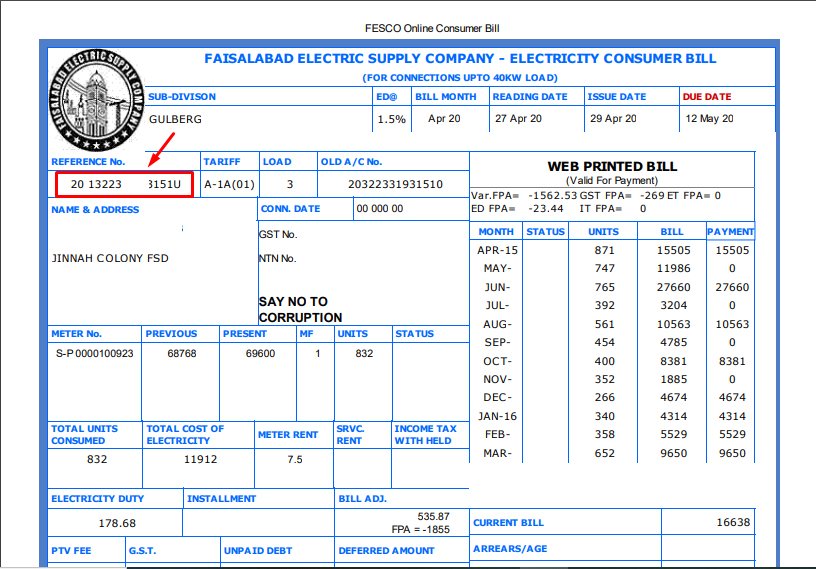
The reference number is one of the most important pieces of information on your electricity bill.
It is associated with your electricity billing account and is commonly used when looking up the bill online.
If you are checking your bill for the first time, take the reference number directly from an old bill rather than trying to guess it.
There are other identifiers on an electricity bill as well, including consumer-related information and meter details. Because different billing systems and services can ask for different fields, always follow the field requested by the particular bill-checking service.
If you are confused about the difference between these numbers, I have explained it separately here:
Reference Number vs Consumer Number: What Is the Difference?
My practical tip
If you are a homeowner or tenant, save the reference number in your phone with a simple name such as:
“FESCO – Home Electricity Bill”
It takes less than a minute and can save you a lot of searching later.
How to Read a FESCO Electricity Bill
This is the part I think many people skip.
When a bill suddenly increases, people often ask, “FESCO ne bill itna zyada kyun bhej diya?” But before assuming there is a billing mistake, look at the actual numbers.
1. Previous Reading
This is the meter reading recorded for the previous billing period.
2. Current Reading
This is the reading used for the current billing period.
3. Units Consumed
The difference between the relevant readings is used to determine electricity consumption, subject to the applicable meter and billing factors.
For example, if a household used noticeably more electricity because of air conditioning during a hot month, the increase in units may explain a large part of the higher bill.
4. Tariff Category
Your connection is billed according to its applicable tariff category.
This is particularly important because electricity tariffs are not simply one universal rate for every consumer.
5. Current Charges
These are the charges associated with the current billing period.
6. Arrears
If an amount from a previous billing period remains unpaid, it may appear as arrears.
7. Taxes and Other Charges
Depending on the applicable billing rules, your bill can contain taxes, duties, adjustments and other charges.
8. Due Date
The due date tells you when the bill should be paid under the normal payment period.
Don’t confuse the billing month with the due date. They are different pieces of information.
A Simple Example for a Pakistani Household
Let’s say a family in Faisalabad normally uses around 250 units a month.
During a particularly hot month, they run air conditioners for longer hours and their consumption rises significantly.
If their next bill is much higher, the first question should not be:
“Why did FESCO suddenly increase my bill?”
Instead, compare:
- Previous month’s units
- Current month’s units
- Previous and current meter readings
- Tariff category
- Arrears
- Taxes and adjustments
- Due date and any applicable late-payment amount
This simple comparison can often tell you whether the increase is mainly related to higher consumption or another billing component.
That is the kind of check I recommend before assuming there is an error.
For a more detailed explanation of Pakistani electricity bills, see:
How to Understand Your Electricity Bill in Pakistan
Why Is My FESCO Bill So High?
This is one of the most common questions electricity consumers ask.
There isn’t always one answer.
A high FESCO bill can be related to:
- Higher electricity consumption
- Air conditioner usage
- Electric heaters
- Water pumps
- Changes in tariff or applicable charges
- Arrears
- Taxes and adjustments
- Late-payment charges
- Meter or billing issues
- A change in consumption pattern
Start with your units
If your bill is much higher than last month, compare the number of units first.
For example, if your household went from 300 units to 500 units, there is already a major change in consumption that needs to be considered before blaming a billing error.
Check the meter reading
If the reading printed on the bill appears unusual, compare it with the actual meter.
If you believe the reading or billing is incorrect, document the difference and contact FESCO through the appropriate official channel.
Don’t ignore arrears
Sometimes consumers look at the current month’s charges and forget that an earlier unpaid amount has been added.
Check the detailed charges
A bill can contain more than the basic electricity consumption charge. Taxes, adjustments and other applicable components can affect the final amount.
For more practical information:
Why Is My Electricity Bill So High?
FESCO Duplicate Bill: Can I Get Another Copy?
Yes, getting a duplicate copy of an electricity bill is useful when the original paper bill is missing or unavailable.
FESCO’s customer-service information includes duplicate bills among its consumer services, and the applicable consumer-service framework also provides for online downloading of electricity bills.
A duplicate bill can be useful for:
- Checking the current amount
- Confirming the due date
- Keeping payment records
- Comparing monthly consumption
- Printing a physical copy
- Maintaining household or business records
If you receive paper bills regularly, I still recommend keeping a digital copy of important bills.
A phone photo or saved PDF is much easier to find six months later than a paper bill buried in a drawer.
How to Download and Print Your FESCO Bill
Once your bill is available online, you can save a copy for future use.
If the bill opens as a PDF or printable document:
- Open the print option in your browser.
- Select Save as PDF if you don’t need a physical copy.
- Choose your printer if you want a paper copy.
- Check the preview before saving or printing.
- Keep the PDF somewhere you can find it later.
I recommend naming the file something simple, such as:
FESCO Bill – August 2026
That makes it much easier to compare bills later.
For a detailed step-by-step guide:
How to Download and Print Electricity Bill Online in Pakistan
How to Pay Your FESCO Bill Online
Once you know the payable amount, you can choose an available payment method that suits you.
Depending on the bank or payment service, options may include:
- Mobile banking
- Internet banking
- ATM payments
- Digital payment services
- Bank branches
- Authorized payment channels
Before confirming a payment, carefully check the consumer or reference information and the amount shown by the payment service.
Keep your payment confirmation or receipt.
This is especially important if you are paying close to the due date.
For a broader guide:
How to Pay Your Electricity Bill in Pakistan
You can also read:
What If Your FESCO Bill Is Not Showing Online?
If the bill does not appear, don’t immediately assume that your connection has a problem.
Try these checks first.
Check the reference number again
Compare every digit with your previous bill.
Try again later
Temporary technical problems can affect online services.
Use your latest previous bill
If you have several old bills, use the most recent one to confirm your billing information.
Check whether you are using the correct distribution company
Pakistan has several electricity distribution companies. If your connection is not in FESCO’s service area, you may need to use another DISCO’s bill service.
Contact FESCO if the problem continues
For account-specific problems, billing corrections, meter issues or other official matters, contact FESCO through its authorized customer-service channels.
FESCO Bill Correction: What Should You Do About a Wrong Bill?
This is an important area where I don’t want to give consumers the wrong advice.
If you believe your bill is incorrect, don’t try to solve the problem by repeatedly checking the bill online. Online bill checking can help you see the information, but an official correction needs to be handled through the utility’s consumer-service process.
Possible issues can include:
- Incorrect meter reading
- Unusual consumption
- Wrong tariff category
- Duplicate or missing payment information
- Arrears that you believe have already been paid
- Meter-related problems
- Other billing discrepancies
FESCO’s customer-service framework includes procedures for billing complaints and correction. The Consumer Service Manual also states that certain arithmetic billing errors can be corrected by authorized officers, while duplicate bills can be issued through designated customer-service channels.
Keep your evidence
If you believe something is wrong, keep:
- Your latest bill
- Previous bill
- Payment receipt, if relevant
- Current meter reading
- Photos of the meter when appropriate
- Reference number
- Consumer information
This gives you a much clearer record when raising a complaint.
What If Your Meter Reading Looks Wrong?
If the reading on your bill appears very different from what you see on your meter, take the issue seriously but don’t jump to a conclusion.
First compare the actual meter reading with the bill.
Then compare it with previous consumption.
If the difference looks unusual, contact FESCO through the official complaint/customer-service process.
This is not just a theoretical issue. NEPRA has published decisions involving FESCO consumers where billing and meter-related disputes were investigated, including cases involving excessive billing and defective meters.
That is why I recommend keeping your old bills. Your previous consumption history can be useful evidence when something suddenly looks abnormal.
FESCO Tariff and Electricity Bill Charges
One mistake I see repeatedly on electricity-bill websites is publishing a single “FESCO unit price” as if every consumer pays exactly the same rate.
That’s not how electricity billing works.
The applicable amount depends on factors such as:
- Consumer category
- Units consumed
- Applicable tariff
- Government taxes and duties
- Regulatory adjustments
- Other charges applicable to the connection
FESCO provides tariff-related information through its customer-service resources, while NEPRA publishes regulatory decisions and tariff-related documents. Because rates and adjustments can change, I recommend checking the latest official information before relying on a particular rate.
Official resource: FESCO Customer Services
For a general explanation of tariff slabs:
Electricity Tariff Slabs in Pakistan Explained
Where Does FESCO Provide Electricity?
FESCO’s service territory includes eight districts:
- Faisalabad
- Sargodha
- Mianwali
- Khushab
- Jhang
- Bhakkar
- Toba Tek Singh
- Chiniot
This matters when checking an electricity bill online because Pakistan has multiple distribution companies.
If your connection belongs to another DISCO, use the relevant page instead:
- PESCO Online Bill
- LESCO Bill Check
- MEPCO Online Bill
- IESCO Online Bill
- GEPCO Online Bill
- HESCO Online Bill
- QESCO Online Bill
- SEPCO Online Bill
- TESCO Online Bill
How I Recommend Keeping Track of Your FESCO Bills
You don’t need a complicated spreadsheet.
For a normal household, I recommend keeping three things:
1. Your reference number
Save it in your phone.
2. Your monthly PDF bills
Keep the latest few bills in one folder.
3. Your monthly units
Write down the units consumed each month.
For example:
| Month | Units |
|---|---|
| May | 280 |
| June | 315 |
| July | 470 |
This simple record can tell you much more than the final rupee amount.
If July’s bill suddenly becomes much higher, you can immediately see that consumption also increased. From there, you can investigate the meter reading, appliance usage, tariff and other charges.
Practical Ways to Reduce Your FESCO Bill
I don’t recommend unrealistic “electricity-saving hacks.” The most useful approach is to reduce unnecessary consumption and understand where your units are going.
Use air conditioners carefully
ACs can become a major part of household electricity consumption during hot weather. Keep filters clean and avoid unnecessarily low temperature settings.
Pay attention to water pumps
A pump that runs longer than necessary can add to monthly consumption. Check for leaks or mechanical problems if it appears to be running unusually often.
Don’t ignore old appliances
Older refrigerators, fans, motors and other appliances can consume more electricity than newer efficient models.
Switch off unnecessary loads
Lights, fans and appliances that are left running in empty rooms add up over time.
Monitor your units
This is the most important habit.
Don’t wait until the bill arrives to discover that your consumption has doubled.
Check your monthly units and compare them with previous months.
FESCO Online Bill FAQs
How can I check my FESCO bill online?
You can use your FESCO reference number on an online bill-checking service to access the available billing information.
What do I need to check my FESCO bill?
Your reference number from a previous FESCO electricity bill is the main information you should keep available.
Can I check my FESCO bill without the printed copy?
Yes. If you already have your reference information from an older bill, you don’t necessarily need the current paper bill to start the online lookup.
Can I download a duplicate FESCO bill?
Yes. Online bill services can provide access to a duplicate copy when the relevant billing record is available. FESCO’s consumer-service framework also recognizes online downloading of electricity bills.
Why is my FESCO bill suddenly higher?
Start by comparing your units with the previous month. Then check the meter readings, tariff category, arrears, taxes and applicable adjustments.
What should I do if my meter reading seems incorrect?
Compare the reading on the bill with your physical meter and previous bills. If the difference appears incorrect, contact FESCO through its official consumer-service/complaint process.
Can I pay my FESCO bill online?
Payment options depend on the available bank, wallet, or authorized payment service. Always verify the consumer information and keep the payment confirmation.
Is OnlineBill.pk the official FESCO website?
No. OnlineBill.pk is an independent electricity-bill information and bill-checking website. FESCO’s official channels should be used for complaints, bill corrections, tariff information, new connections, and other official services.
Where can I find official FESCO information?
For official information, use FESCO’s website and customer-service resources. NEPRA is the relevant electricity-sector regulator and also publishes regulatory decisions and tariff-related documents.
My Final Advice to FESCO Consumers
If you remember only one thing from this guide, make it this:
Don’t judge your electricity bill only by the final amount.
When a bill looks unusually high, compare the units, meter readings, billing period, tariff category, arrears and other charges.
If everything looks normal, the higher amount may simply reflect higher consumption or applicable billing changes. If something doesn’t match your meter, previous bills or payment records, keep the evidence and raise the issue through the proper FESCO channel.
I’ve spent years working with electricity-billing websites in Pakistan, and one thing I’ve learned is that people usually don’t need more complicated information—they need clear information they can actually use.
That is the approach I’m trying to follow with OnlineBill.pk.
If you need to check your current bill, start here:
And if you need help understanding the bill rather than simply finding it, explore our other guides on electricity billing, payments, reference numbers and tariff slabs.
About the Founder
Khurram Shahzad – Founder, OnlineBill.pk
I’m Khurram Shahzad, the founder of OnlineBill.pk.
I’ve spent the last five years working with electricity billing websites in Pakistan, and during that time I’ve seen the same questions come up again and again.
People couldn’t find their bill when the printed copy didn’t arrive. They weren’t sure why the amount had suddenly increased. Some didn’t know the difference between a reference number and other consumer details. Others had a genuine billing or meter problem but didn’t know where to start.
I started OnlineBill.pk to make that process simpler.
My goal is straightforward: help people check their electricity bills quickly, understand what they are being charged for, and know what to do when something doesn’t look right.
OnlineBill.pk is currently a one-person project, which means I personally work on the site’s content and improvements. I don’t want the website to be another collection of short articles written only to target keywords. I want the information here to be practical enough that someone can actually use it when dealing with a real electricity bill.
As the site grows, I plan to expand the guides and cover more electricity companies and consumer questions across Pakistan.
I also believe in being clear about what OnlineBill.pk is and what it isn’t.
We are not FESCO. We don’t issue electricity bills, change tariffs, process official complaints or control the utility’s billing system. Our role is to make online bill information easier to access and explain.
When an official source is available, I prefer to point readers toward it rather than pretend that an independent website is the authority.
That’s the standard I want to maintain as OnlineBill.pk grows.
Useful FESCO and Electricity Resources
More guides from OnlineBill.pk
- How to Check Electricity Bill Online in Pakistan
- How to Pay Your Electricity Bill in Pakistan
- How to Download and Print Electricity Bill Online
- Reference Number vs Consumer Number
- How to Understand Your Electricity Bill
- Electricity Tariff Slabs in Pakistan Explained
- Why Is My Electricity Bill So High?