
Check Your PESCO Bill
Enter your 14-digit reference number to view your latest electricity bill instantly.
How to Check PESCO Online Bill
Checking your PESCO electricity bill online is simple. Follow these three steps to access your available bill information online.
Select PESCO
Open the bill checking tool above and select PESCO as your electricity distribution company.
Enter Your Reference Number
Enter the required Reference Number carefully in the provided field. You can find this number on your previous PESCO electricity bill.
View Your Bill
Click the View My Bill button to access your available PESCO electricity bill through the relevant billing service.
Where Can You Find Your PESCO Reference Number?
Your PESCO Reference Number is required to access your electricity bill online. You can find this number on a previous PESCO bill.
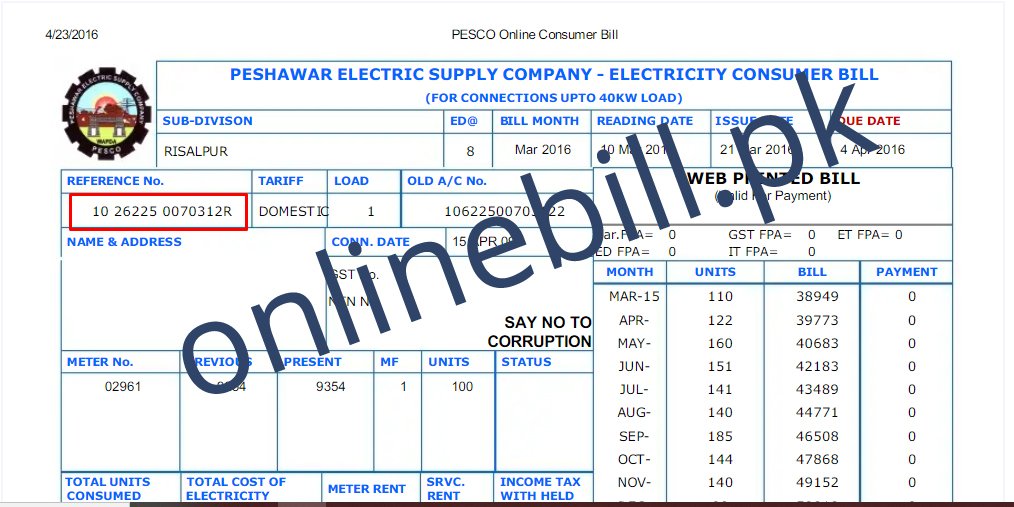 Example of a PESCO electricity bill
How to Find Your Reference Number
If you want to check your PESCO bill online, you will generally need the Reference Number shown on your electricity bill.
Take your previous PESCO electricity bill and carefully look at the billing information printed on it. The Reference Number is associated with your electricity connection and can be used to access your available bill information online.
Take your latest or previous PESCO electricity bill.
Locate the Reference Number in the billing or consumer information section of the bill.
Enter the Reference Number carefully in the PESCO bill checking tool above.
How to Download or Print Your PESCO Bill
Need a copy of your PESCO electricity bill? After accessing your available bill information online, you can save or print the bill for your records and future use.
Access Your Bill
Use the PESCO bill checking tool above and enter your Reference Number to access your available electricity bill information.
Open the Bill Details
Once your bill is available, review the displayed billing information and check that the details belong to your electricity connection.
Download or Save
If a download or save option is available on the billing page, use it to keep a digital copy of your PESCO bill on your device.
Print Your Bill
If you need a physical copy, use the available print option. On a computer, you can also use your browser’s print function to print the displayed bill.
Understanding Your PESCO Electricity Bill
Your PESCO electricity bill contains important information about your connection, billing period, payable amount, and payment details. Here are some common details you may find on your bill.
Reference Number
The Reference Number is a unique number associated with your electricity connection. It may be required when checking your PESCO bill online.
Consumer Information
Your bill may include information related to the electricity connection and consumer, such as the consumer name, address, and other connection details.
Billing Period
The billing period indicates the month or period for which electricity consumption and charges have been calculated.
Due Date
The due date shows the date by which the bill should generally be paid to avoid possible late payment charges or other applicable consequences.
Current Bill Amount
This section shows the amount charged for the current billing period. The total payable amount can depend on electricity consumption and applicable charges.
Previous or Outstanding Amount
If there is an unpaid amount from an earlier billing period, the bill may show previous dues or outstanding charges along with the current bill information.
PESCO Bill Due Date and Payment Information
Checking your PESCO bill online helps you review the bill amount, due date, and other available billing details before making a payment.
Check Your Bill Due Date
The due date is shown on your electricity bill and indicates the payment deadline for the current billing period. Check your bill carefully to identify the applicable due date.
Review the Payable Amount
Before making a payment, review the total amount shown on your PESCO bill. If your bill includes previous outstanding dues or other applicable charges, check the complete bill details.
Pay Before the Due Date
Once you have reviewed your bill, use an available payment channel supported by your bank or relevant bill payment service. Follow the payment instructions provided by the service you use.
Keep Your Payment Record
After completing your payment, keep the transaction receipt or confirmation for your records. It may be useful if you need to verify a payment later.
Common PESCO Online Bill Problems and Solutions
Having trouble accessing your PESCO electricity bill online? Check the common issues below and try the suggested solutions.
01 My PESCO bill is not showing +
If your bill does not appear after entering your Reference Number, first check that the number has been entered correctly. Make sure there are no missing or incorrect digits.
If the information is correct, try again after some time. Billing information may not always be immediately available depending on the billing cycle or service availability.
02 I entered the Reference Number but received an error +
Check your Reference Number carefully against a previous PESCO electricity bill. Enter all required digits correctly and try the bill checking process again.
If the issue continues, make sure you are using the correct billing company and that your connection details are entered correctly.
03 I cannot find my PESCO Reference Number +
Check a previous PESCO electricity bill and look for the Reference Number in the billing or consumer information section.
You can also use the bill image and reference number guide provided above on this page to help locate the required information.
04 My bill information appears to be incorrect +
Carefully review the information displayed on your bill, including the consumer details and billing information.
If you believe the billing information or connection details are incorrect, contact the relevant electricity distribution company through its official customer support channels.
05 The bill page is not loading properly +
Check your internet connection and try refreshing the page. You can also try opening the bill again using a different browser or device.
If the problem is temporary, waiting a few minutes and trying again may also help.
06 I need help with a billing dispute +
OnlineBill.pk is an independent informational platform and does not issue or modify electricity bills.
For billing disputes, incorrect charges, connection issues, or official complaints, contact PESCO through its official customer support or complaint channels.
Frequently Asked Questions About PESCO Online Bill
Find quick answers to common questions about checking and accessing your PESCO electricity bill online.
How can I check my PESCO bill online? +
To check your PESCO electricity bill online, use the bill checking tool available on this page. Select PESCO, enter the required Reference Number, and click the bill checking button. Your bill information can then be accessed through the relevant official billing portal.
What information do I need to check my PESCO bill? +
You generally need the Reference Number associated with your PESCO electricity connection. You can find this information on a previous electricity bill.
Where can I find my PESCO Reference Number? +
Your PESCO Reference Number can usually be found on your previous electricity bill. If you are unsure where to locate it, check the PESCO bill image and guide provided earlier on this page.
Can I download or print my PESCO electricity bill? +
If the official billing portal provides a printable or downloadable version of your bill, you can use the available options on that portal to save or print your bill for your records.
Why is my PESCO bill not showing online? +
First, check that you have entered the correct Reference Number and selected PESCO as your electricity company. If the details are correct and the bill is still unavailable, try again later as billing information or the official billing service may temporarily be unavailable.
Can I check my old PESCO electricity bill online? +
The availability of previous or older bills depends on the records and services provided by the relevant official billing system. If an older bill is not available, you may need to contact PESCO through its official customer support channels.
What should I do if I enter the wrong Reference Number? +
If you enter an incorrect Reference Number, check it against your previous PESCO bill and enter the correct number again. Make sure all required digits are entered correctly.
Does OnlineBill.pk issue PESCO electricity bills? +
No. OnlineBill.pk is an independent informational platform. Our website helps users access online bill checking services. Electricity bills are issued and maintained by the relevant electricity distribution company and its official billing systems.
PESCO Contact Information & Customer Support
If you have a billing complaint, electricity service issue, or need assistance with PESCO services, you can contact PESCO through its official customer support channels.
PESCO Helpline
For electricity-related complaints and customer support, contact the PESCO helpline.
Call 118PESCO SMS Service
Customers can use the PESCO SMS service for submitting electricity-related complaints.
SMS 8118PESCO Official Website
Visit the official PESCO website for customer services, complaints, electricity information, and other services.
Visit PESCO Website →OnlineBill.pk is an independent informational website and is not affiliated with, operated by, or officially associated with PESCO. We help users access online bill checking information for their convenience. For official complaints, billing disputes, service requests, or account-related matters, please contact PESCO directly through its official channels.
Need Official PESCO Assistance?
For official customer support and electricity-related services, visit the PESCO website.