
Check MEPCO Bill Online
Enter your reference number to view your MEPCO bill.
Check Your MEPCO Bill Again
Find it on your previous electricity bill.
This number is printed in the top-right corner of your last electricity bill, usually labelled “Reference No.” or “Ref #”.
Saved only on this device. We never store this on our servers.
MEPCO Online Bill Check
Checking your MEPCO electricity bill online is a convenient way to access your latest billing information without waiting for a paper copy. If you have the required billing information from a previous MEPCO bill, you can use the bill-checking tool above to start the process.
OnlineBill.pk provides a simple and convenient way for MEPCO consumers to access the relevant online bill-checking service. After entering the required information, you can access your available bill through the relevant official billing service.
How to Check MEPCO Online Bill
You can check your MEPCO electricity bill online in a few simple steps. Use the bill-checking tool above and follow the process below to access your available bill through the relevant official billing service.
Enter Your Reference Number
Enter the required MEPCO billing information in the bill-checking tool above. You can usually find your Reference Number on a previous electricity bill.
Learn Where to Find Your Reference Number →Click View Bill
After entering your information, review the details carefully and click the View Bill button to continue to the relevant billing service.
Access Your Bill
Your available bill information can then be accessed through the relevant official billing service. Where available, you may also be able to download or print a copy for your records.
Need help finding your bill? If you are not sure which information you need to enter, visit the OnlineBill.pk homepage or check our guide on finding your electricity bill Reference Number .
How to Find Your MEPCO Reference Number
Your MEPCO Reference Number is an important billing detail that can be found on your electricity bill. You may need this information when checking your MEPCO bill online.
To find your Reference Number, open a previous MEPCO electricity bill and look for the billing information section. The Reference Number is clearly printed on the bill and can be used when accessing the relevant online billing service.
Enter your Reference Number carefully and check each digit before submitting your bill request. An incorrect number may prevent the billing service from finding the correct record.
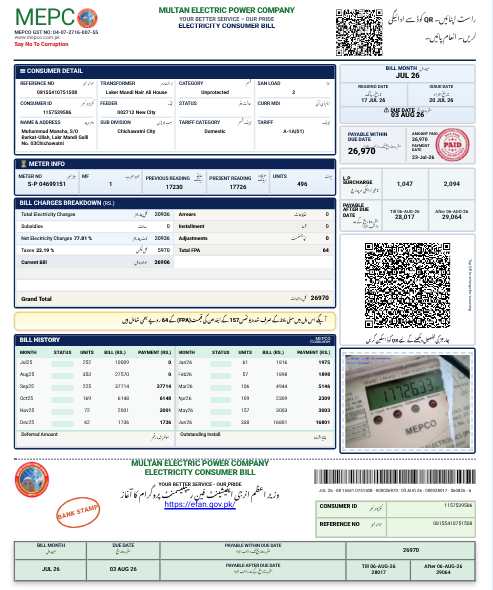
Use your previous MEPCO electricity bill to locate the billing information required for online bill checking.
How to Download or Print Your MEPCO Bill
After accessing your MEPCO electricity bill through the relevant official billing service, you can save a copy for your records or print it when needed.
Open Your Bill
Once your bill is available, review the displayed billing information and make sure it belongs to the correct connection.
Save a Copy
If the billing service provides a download or print option, you can save a digital copy of your bill for future reference.
Print Your Bill
You can use your browser’s print option or the available print feature to get a physical copy when required for payment or records.
OnlineBill.pk helps users access electricity bill information through the relevant billing services. The availability of download and print options may depend on the official billing portal you are redirected to.
Understanding Your MEPCO Electricity Bill
A MEPCO electricity bill contains several sections with important information about your connection, meter readings, billing charges, due date, and payment amount. Understanding these details can help you review your bill more easily.
Consumer Details
The Consumer Detail section contains information associated with your electricity connection. Depending on the bill, this area may include details such as your reference number, consumer information, tariff category, sanctioned load, feeder, and other connection-related information.
Meter Information
The Meter Information section shows details related to the electricity meter and its readings. The bill example includes meter reading information along with previous reading, present reading, and units.
These details help you understand the electricity consumption recorded for the billing period.
Bill Charges Breakdown
The Bill Charges Breakdown section provides a summary of different charges included in the electricity bill. The displayed bill includes items such as total electricity charges, subsidies, net electricity charges, taxes, and current bill information.
Bill Month and Due Date
Your bill also shows the billing month and important payment dates. The bill example displays the bill month along with the due date and the date after which late payment information may apply.
Payable Amount
The bill displays the amount payable within the due date and the amount payable after the due date. Always review the payment amount and due date shown on your current bill before making a payment.
Bill History
The Bill History section provides previous billing information shown on the bill. This can help you review past billing periods, recorded units, and previous bill amounts displayed in the billing history.
If you are checking your MEPCO bill online, keep your previous bill available so you can compare the information and enter the required billing details correctly.
MEPCO Bill Due Date and Payment Information
Your MEPCO electricity bill contains important payment information, including the due date and payable amount. Review these details carefully before making your bill payment.
Check Your Due Date
The due date is shown on your MEPCO electricity bill. Check the payment date carefully so you know when the bill is due.
Review the Payable Amount
Before making a payment, review the amount shown on your current bill. Your bill may display the amount payable within the due date and information about payment after the due date.
Keep Your Bill Record
After checking your bill, you can keep a digital or printed copy for your personal records and future reference.
Always check the latest bill for the correct due date and payable amount. If you have an outstanding amount or need clarification about your bill, refer to the information provided on your current bill or contact the relevant electricity service provider.
Common MEPCO Online Bill Problems and Solutions
Sometimes you may face a problem while checking your MEPCO electricity bill online. The following information can help you understand some common issues and what you can do next.
My MEPCO Bill Is Not Showing
If your bill does not appear after entering your billing information, first check that you have entered the required number correctly. Make sure there are no missing or extra digits.
Invalid Reference Number or Details
An incorrect Reference Number or billing detail may prevent the system from finding your electricity bill.
The Bill Page Is Not Loading
If the bill page takes too long to load or does not open, the issue may be temporary. It can sometimes happen because of internet connectivity or temporary availability issues with the relevant billing portal.
My Old Bill Is Available but I Need the Current Bill
If you can access billing information but the details you see do not appear to be the latest bill, check the billing month and due date shown on the bill.
MEPCO Bill Is Difficult to View on Mobile
Electricity bills can contain detailed information and may sometimes be difficult to read on a smaller screen.
The Official Billing Portal Is Temporarily Unavailable
If the relevant official billing portal is temporarily unavailable, your bill may not load even when the information you entered is correct.
Ready to Check Your MEPCO Bill?
Enter your required billing information and access your available MEPCO electricity bill online.
Frequently Asked Questions About MEPCO Online Bill
Find answers to common questions about checking, viewing, and accessing your MEPCO electricity bill online.
How can I check my MEPCO bill online? +
To check your MEPCO electricity bill online, select MEPCO from the bill checking tool and enter the required billing information. After submitting the details, your available bill information can be accessed through the relevant official billing service.
What information do I need to check my MEPCO bill? +
The information required may depend on the billing service. In most cases, you may need your MEPCO Reference Number or other identifying billing information shown on your previous electricity bill.
Where can I find my MEPCO Reference Number? +
Your MEPCO Reference Number can be found on your electricity bill. If you have a previous bill available, look for the reference number in the consumer or billing details section.
Can I check my MEPCO bill using my mobile phone? +
Yes. You can use a smartphone or tablet with an internet connection to access the MEPCO bill checking service. Make sure you enter the required billing information correctly.
Can I download or print my MEPCO electricity bill? +
If the bill is available through the relevant billing portal, you may be able to save, download, or print the bill using the options provided by your browser or the billing service.
Why is my MEPCO bill not showing? +
If your bill is not showing, check that the Reference Number or other required information has been entered correctly. If the details are correct and the bill still does not appear, try again later as the relevant billing service may be temporarily unavailable.
How do I know the due date of my MEPCO bill? +
The due date is displayed on your current MEPCO electricity bill. Always check the latest available bill for the correct billing month, due date, and payable amount.
Can I check my previous MEPCO bill online? +
The availability of previous bills depends on the relevant billing service. If you need an older bill, check the available options provided by the official billing portal or keep a copy of your previously accessed bills for future reference.
Is OnlineBill.pk an official MEPCO website? +
No. OnlineBill.pk is an independent informational platform that helps users access electricity bill checking services. It is not affiliated with or officially endorsed by MEPCO or any government organization.
About OnlineBill.pk and MEPCO Bill Services
We aim to make it easier for users to access electricity bill information online through a simple and convenient experience.
Independent Platform
OnlineBill.pk is an independent informational website created to help users access online electricity bill checking services. We are not a government department or an official MEPCO website.
Access to Relevant Billing Service
When you use our bill checking tool, you may be directed to the relevant official billing service to access available electricity bill information.
Check Your Information Carefully
Always enter your Reference Number or other required billing information carefully. Before making a payment, review the bill month, due date, and payable amount shown on your current bill.
Information May Change
Electricity billing services and procedures may change over time. For the latest billing information, payment instructions, or account-related assistance, users should refer to the relevant official electricity service provider.
OnlineBill.pk does not issue electricity bills, collect electricity payments, or manage customer accounts. Our website provides informational guidance and helps users access available online bill checking services for their convenience.
Check Other Electricity Bills Online
Looking for another electricity bill service? Select your electricity company below to check your bill online.